Add, Edit, Delete files in the list of files found based on their signature
IsoBuster is not an image file editor. It cannot change the content of image files. This functionality offers the possibility to define files based on their known properties, so that you have a way to extract them from the medium in case they can't be found.
The availability of these options needs to be enabled via the Options in case of lost files and folders, not in case of a customizable file system. Once enabled, they appear when you right mouse click on a file in the list of files found based on their signature
 or on a file in the added customizable file system.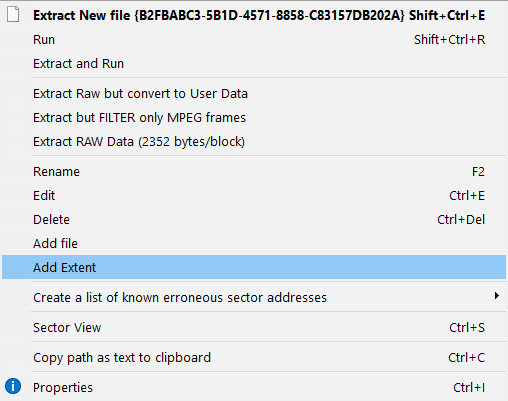
FYI: To create a list of lost and found files, read this part.
Add / Edit a file:
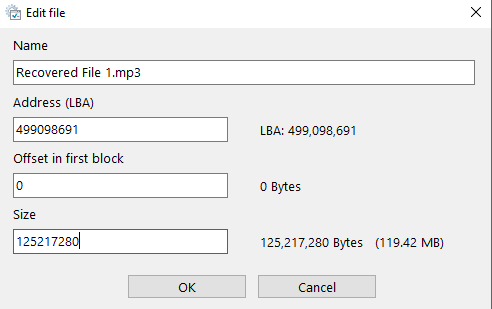
The use of this feature is straightforward. Suppose a file is found to start at an address (LBA x) but you know, because you saw it with the sector viewer or you are exploring the engineering power of IsoBuster, that the file starts a block later, then you can adjust the address to x+1. Or suppose you know that the file only starts at a certain offset inside the block, then you can change that as well. Same approach for the byte length of a file.
When you right mouse click the
icon you can also add files to the list and change their properties. (same for a customizable file system). It is also possible to remove files from the list. E.g. suppose you adjust one file to be much bigger, then you may want to remove the files this new file now overlaps.For more details and examples, also have a look at:
Creative editing of file properties in files found based on their signature
The same functionality is also available in a customizable file-system that can be added to the track [Professional version feature]
A file can also be split up in different extents on the disc (fragmented). Extents can be added, removed, edited, etc. ...